CPU Usage Monitor3.1.4
Publisher Description
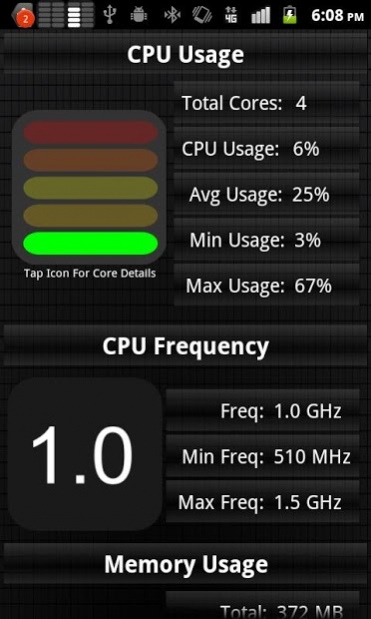
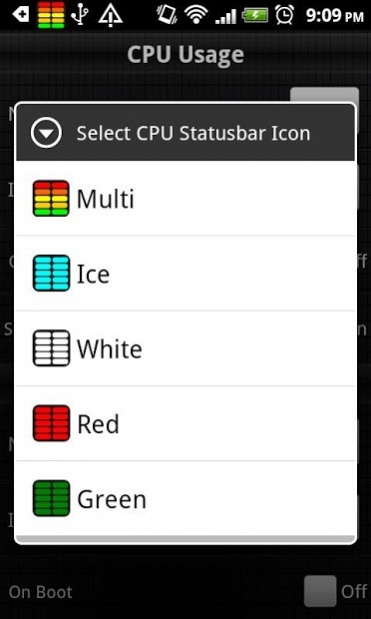
CPU Usage Monitor that displays usage details within your phones statusbar. Great to monitor your CPU Usage, CPU Frequency & System Memory with one simple look. Simple to use User Interface allows you to manage your usage notifications fast & easy.
Features Include
* Single Core, Dual Core (NVIDIA Tegra 2), & Quad Core (NVIDIA Tegra 3) support
* Qualcomm Snapdragon(TM) S4 Pro support
* Statusbar notification for CPU Usage
* Statusbar notification for CPU Frequency Usage
* Statusbar notification for Memory Usage
* Multiple Statusbar notification colors
* White
* Red
* Green
* Blue
* Multi
* Task Killer feature. Allows you to stop running Apps
Questions or comments? See our Google + Page
https://plus.google.com/u/0/b/102867865651721435155/102867865651721435155
About CPU Usage Monitor
The company that develops CPU Usage Monitor is Pocket App Builders. The latest version released by its developer is 3.1.4. This app was rated by 1 users of our site and has an average rating of 4.0.
To install CPU Usage Monitor on your Android device, just click the green Continue To App button above to start the installation process. The app is listed on our website since 2013-06-20 and was downloaded 62 times. We have already checked if the download link is safe, however for your own protection we recommend that you scan the downloaded app with your antivirus. Your antivirus may detect the CPU Usage Monitor as malware as malware if the download link to com.pocketappbuilders.cpuusagestatusbar is broken.
How to install CPU Usage Monitor on your Android device:
- Click on the Continue To App button on our website. This will redirect you to Google Play.
- Once the CPU Usage Monitor is shown in the Google Play listing of your Android device, you can start its download and installation. Tap on the Install button located below the search bar and to the right of the app icon.
- A pop-up window with the permissions required by CPU Usage Monitor will be shown. Click on Accept to continue the process.
- CPU Usage Monitor will be downloaded onto your device, displaying a progress. Once the download completes, the installation will start and you'll get a notification after the installation is finished.
Program Details
System requirements
Download information
Pricing
Version History
version 3.1.4
posted on 2013-06-20
Several fixes and updates
version 3.1.4
posted on 2013-06-20
version 3.1.4
posted on 2013-06-20
3.1.4
Bug fixes
3.1.3
Update for Qualcomm Snapdragon(TM) S4 Pro
UI Updates
Fixed Force Close on Android Jelly Bean
Bug fixes
Please email support@pocketappbuilders.com if you have any problems.
